Barcodes and QR Codes
In this chapter, you will:
- Generate QR codes and Code 128 barcodes from any string
- Customize colors with solid fills, gradients, and GPU content
- Understand how the GPU-based rendering pipeline keeps codes crisp at any size
- Build a shareable QR code component for your app
Need to let users share a link by scanning their phone, or display a product barcode in a retail app? The waterui-barcode crate renders barcodes and QR codes entirely on the GPU. Module data is encoded on the CPU, packed into a bit buffer, and rasterized by a fragment shader – producing crisp output at any resolution with no CPU rasterization overhead.
Feature flag: Barcodes live behind the
barcodefeature onwaterui. Enable it inCargo.toml(waterui = { version = "...", features = ["barcode"] }) before importingwaterui::barcode.
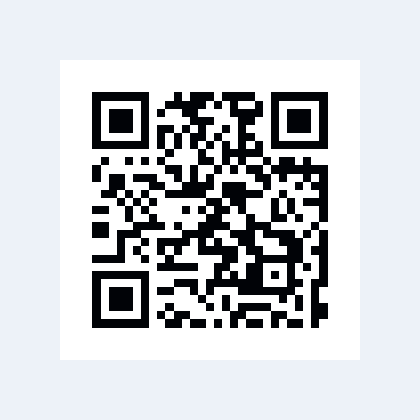
A QR code rendered from the pinned WaterUI barcode component. Example source.
Quick Start
use waterui::barcode::Barcode;

// QR code
fn my_qr() -> impl View {
    Barcode::qr("https://waterui.dev")
}

// 1D barcode
fn my_barcode() -> impl View {
    Barcode::code128("HELLO-WATERUI")
}
Both Barcode::qr and Barcode::code128 return a Barcode struct that
implements View and can be placed directly in your view hierarchy.
Supported Symbologies
| Symbology | Constructor | Dimensions | Description |
|---|---|---|---|
| QR Code | Barcode::qr(content) | 2D | Square matrix, widely used for URLs, text, and data |
| Code 128 | Barcode::code128(content) | 1D | High-density linear barcode for alphanumeric data |
The BarcodeSymbology enum represents these:
pub enum BarcodeSymbology {
    Qr,
    Code128,
}
Barcode::new(content) is an alias for Barcode::qr(content).
Customizing Colors
The default black-and-white look works fine, but you can match your app’s branding with custom colors.
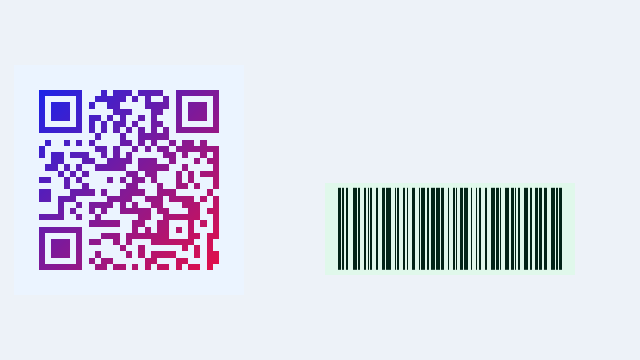
A Hydrolysis preview of custom barcode colors and gradient fills. Example source.
Dark Module Color
By default, dark modules are black. Change them with dark_color. Srgb::new
takes three linear-light channels in 0.0..=1.0:
use waterui::barcode::Barcode;
use waterui::graphics::color::Srgb;

fn blue_qr() -> impl View {
    Barcode::qr("https://waterui.dev")
        .dark_color(Srgb::new(0.0, 0.3, 0.8))
}
Light Module / Background Color
Change the background (light modules and quiet zone):
fn dark_mode_qr() -> impl View {
    Barcode::qr("https://waterui.dev")
        .dark_color(Srgb::WHITE)
        .light_color(Srgb::new(0.1, 0.1, 0.1))
}
Gradient Fill
Apply a linear gradient to the dark modules for a more eye-catching look:
use waterui::barcode::Barcode;
use waterui::graphics::color::Srgb;

fn gradient_qr() -> impl View {
    Barcode::qr("https://waterui.dev")
        .linear_gradient(
            Srgb::new(0.0, 0.5, 1.0), // start color (blue)
            Srgb::new(1.0, 0.0, 0.5), // end color (pink)
            [0.0, 0.0],               // start point (top-left)
            [1.0, 1.0],               // end point (bottom-right)
        )
}
Gradient coordinates are normalized to the barcode’s bounding square:
[0.0, 0.0]is the top-left corner[1.0, 1.0]is the bottom-right corner
GPU-Content Fill
For advanced effects – imagine a QR code filled with an animated gradient, or modules that shimmer with a particle effect – use fill_gpu. Any type implementing GpuView can serve as the fill source:
use waterui::barcode::Barcode;

fn artistic_qr(animated_renderer: impl GpuView) -> impl View {
    Barcode::qr("https://waterui.dev")
        .fill_gpu(animated_renderer)
        .light_color(Srgb::WHITE)
}
This creates a BarcodeGpuFill<V> view that:
- Renders the fill content to an offscreen texture.
- Applies a barcode mask effect where dark modules sample from the fill texture and light modules use the configured light color.
The mask is applied via the BarcodeMaskEffect shader, which runs the same
packed-matrix lookup as the standard renderer but composites the fill texture
instead of a flat color.
The BarcodeFill Enum
Under the hood, the fill style for solid colors and gradients is represented
as BarcodeFill:
pub enum BarcodeFill {
    Solid(Srgb),
    LinearGradient {
        start_color: Srgb,
        end_color: Srgb,
        start_point: [f32; 2],
        end_point: [f32; 2],
    },
}
You do not need to construct this directly – dark_color and
linear_gradient produce the appropriate variant for you.
How It Works
Understanding the rendering pipeline helps you appreciate why QR codes stay perfectly sharp at any zoom level.
Matrix Generation
When a Barcode view renders, it first generates the module matrix:
- QR codes use the
fast_qrcrate. The QR matrix dimension depends on the content length and error correction level. - Code 128 uses the
barcoderscrate. The 1D bar pattern is repeated on every row to produce a square matrix compatible with the same GPU shader.
Bit Packing
The matrix is packed into a Vec<u32> where each u32 holds 32 modules as
individual bits:
- Bit value
1= dark module - Bit value
0= light module
For a 25x25 QR code, the total is 625 modules requiring 20 u32 words. This compact representation is uploaded as a GPU storage buffer.
Fragment Shader Rasterization
The shader (qr_render.wgsl) receives:
- A uniform buffer with the matrix dimension, quiet zone size, output resolution, and color/gradient parameters
- A read-only storage buffer with the packed matrix bits
For each fragment, the shader:
- Maps the pixel position to a module coordinate (accounting for quiet zone)
- Looks up the corresponding bit in the packed buffer
- Outputs the dark or light color (or gradient-interpolated color)
This approach renders at any resolution without aliasing artifacts because the module lookup is resolution-independent.
Quiet Zones
Each symbology includes an appropriate quiet zone (margin):
| Symbology | Quiet Zone (modules) |
|---|---|
| QR Code | 4 |
| Code 128 | 10 |
The quiet zone is rendered in the light color and is included automatically.
API Reference Summary
Barcode
| Method | Description |
|---|---|
Barcode::new(content) | Create a QR code (alias for qr) |
Barcode::qr(content) | Create a QR code |
Barcode::code128(content) | Create a Code 128 barcode |
.dark_color(color) | Set solid dark module color |
.light_color(color) | Set light module / background color |
.linear_gradient(start, end, from, to) | Apply gradient to dark modules |
.fill_gpu(gpu_view) | Fill dark modules with GPU-rendered content |
BarcodeGpuFill<V>
| Method | Description |
|---|---|
.light_color(color) | Set light module / background color |
BarcodeRenderer
For direct GPU pipeline integration:
| Method | Description |
|---|---|
BarcodeRenderer::new(source) | Create with default black/white colors |
BarcodeRenderer::new_with_colors(source, dark, light) | Create with custom solid colors |
BarcodeRenderer::new_with_fill(source, fill, light) | Create with a BarcodeFill |
The renderer implements GpuRenderer, so it can be used with GpuSurface
and the rest of the graphics pipeline.
BarcodeSource
| Method | Description |
|---|---|
BarcodeSource::qr(content) | Create a QR source |
BarcodeSource::code128(content) | Create a Code 128 source |
.set_size(pixels) | Set the output size (default: 256) |
.size() | Get the current output size |
.symbology() | Get the symbology type |
.quiet_zone() | Get the quiet zone width in modules |
.matrix() | Get or generate the packed BarcodeMatrix |
Complete Example
A settings page with a shareable QR code:
use waterui::prelude::*;
use waterui::barcode::Barcode;
use waterui::graphics::color::Srgb;

fn share_page() -> impl View {
    let url = "https://book.waterui.dev";

    vstack((
        text("Scan to join"),
        Barcode::qr(url)
            .dark_color(Srgb::new(0.15, 0.15, 0.15))
            .light_color(Srgb::WHITE),
        text(url),
        Spacer::flexible(),
    ))
}
A branded QR code with a gradient:
use waterui::prelude::*;
use waterui::barcode::Barcode;
use waterui::graphics::color::Srgb;

fn branded_qr() -> impl View {
    Barcode::qr("https://waterui.dev")
        .linear_gradient(
            Srgb::new(0.0, 0.4, 0.9), // brand blue
            Srgb::new(0.0, 0.8, 0.6), // brand green
            [0.0, 0.0],
            [1.0, 1.0],
        )
        .light_color(Srgb::new(0.98, 0.98, 0.98))
}
Platform Considerations
The barcode component is fully cross-platform because it renders entirely through WaterUI’s GPU pipeline (wgpu). There is no dependency on platform- specific barcode libraries.
| Feature | All Platforms |
|---|---|
| QR code generation | fast_qr crate (pure Rust) |
| Code 128 generation | barcoders crate (pure Rust) |
| Rendering | Fragment shader via wgpu |
| Gradient fills | GPU shader |
| GPU content fill | BarcodeMaskEffect post-processing shader |
| Scanning / camera decode | Not yet available (planned) |
Note: Barcode scanning (using the device camera to decode barcodes) is not currently part of this crate. It is planned for a future release as part of the WaterKit camera integration.
What’s Next
That wraps up the Rich Content section. You have learned how to display media, embed maps, render web content, and generate barcodes – all from Rust. In the next section, Graphics, you will dive into the GPU and start drawing custom shapes, shaders, and visual effects.