Particle Systems
In this chapter, you will:
- Build GPU-accelerated particle effects with the
ParticleSystemview- Configure emitters, motion, collisions, and blend modes from a single chain
- Use built-in shapes for fireworks, rain, snow, and ambient effects
- Apply collision and particle-particle interaction without writing shaders
- Render particle systems offscreen for visual testing
Picture confetti bursting across the screen when a user completes a purchase, or snowflakes drifting gently behind a winter-themed card. Particle effects bring delight and motion to an app – and with WaterUI’s ParticleSystem view, you describe the effect declaratively and the GPU does the rest.
Feature flag: Particles live behind the
particlefeature onwaterui. Enable it inCargo.toml(waterui = { version = "...", features = ["particle"] }) before importingwaterui::particle.
Quick Start
use waterui::prelude::*;
use waterui::particle::ParticleSystem;
use core::f32::consts::PI;

fn rain() -> impl View {
    ParticleSystem::new(5_000)
        .emit_from_rect(1.5, 0.0)
        .at(0.5, -0.05)
        .rate(800.0)
        .life(0.8..1.3)
        .speed(1.8..2.2)
        .angle(PI * 0.49..PI * 0.51)
        .size(0.002..0.004)
        .color(
            Color::srgb(255, 255, 255).with_opacity(0.5),
            Color::transparent(),
        )
        .stretch_with_velocity()
        .gravity(0.0, 2.5)
}
ParticleSystem is itself a View, so it composes with vstack, zstack, frames, and any other layout primitive in the framework.
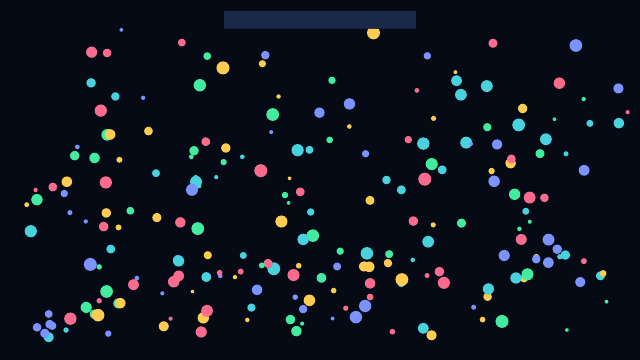
A WaterUI preview image illustrating a confetti particle emitter. Example source.
How It Works
ParticleSystem builds an internal ParticleConfig through a flat modifier chain. When the view is rendered, it materializes a GPU surface that:
- Allocates a particle storage buffer sized to
max_particles. - Runs a compute shader each frame to emit, advance, and recycle particles.
- Renders all live particles in a single instanced draw call.
- Returns
needs_redraw() = truewhile at least one particle is alive.
Coordinates are normalized: [0.0, 0.0] is the top-left of the system’s frame and [1.0, 1.0] is the bottom-right. Sizes, gravity, and emitter offsets all use the same normalized space, which means an effect looks identical at any output resolution.
Configuring the Emitter
The emitter controls where particles spawn and how often.
| Modifier | Description |
|---|---|
at(x, y) | Position the emitter (normalized coordinates) |
rate(per_second) | Particles per second |
emit_from_point() | Spawn from a single point (default) |
emit_from_rect(width, height) | Spawn anywhere inside a rectangle |
emit_from_circle(radius) | Spawn anywhere inside a disk |
use waterui::particle::ParticleSystem;

ParticleSystem::new(2_000)
    .emit_from_circle(0.05)
    .at(0.5, 0.5)
    .rate(400.0);
Particle Properties
Each particle is randomized within the ranges you provide.
| Modifier | Description |
|---|---|
life(range) | Lifetime in seconds |
speed(range) | Initial speed magnitude |
angle(range) | Initial direction in radians |
size(range) | Particle size in normalized units |
spin(range) | Rotation speed in radians/second |
color(start, end) | Tint at birth and at death |
softness(value) | Edge softness (0.0 hard, 1.0 soft) |
shape(ParticleShape) | Circle or Rect SDF sprite |
stretch_with_velocity() | Stretch the sprite along its velocity vector |
use waterui::particle::{ParticleShape, ParticleSystem};
use core::f32::consts::TAU;

ParticleSystem::new(1_500)
    .emit_from_point()
    .at(0.5, 0.8)
    .rate(120.0)
    .life(0.6..1.4)
    .speed(0.4..0.9)
    .angle(0.0..TAU)
    .size(0.01..0.03)
    .shape(ParticleShape::Circle)
    .softness(0.6);
Environment Forces
Once particles spawn, world-space forces shape their motion.
| Modifier | Description |
|---|---|
gravity(x, y) | Constant acceleration vector |
wind(x, y) | Constant velocity offset |
turbulence(value) | Perlin-style noise jitter |
drag(factor) | Velocity damping per 60 fps frame (1.0 = no damping) |
ParticleSystem::new(3_000)
    .emit_from_rect(1.0, 0.05)
    .at(0.5, 0.0)
    .rate(900.0)
    .life(1.0..2.0)
    .speed(0.0..0.2)
    .gravity(0.0, 0.4)
    .wind(0.05, 0.0)
    .turbulence(0.6)
    .drag(0.98);
Blending and Compositing
Use additive() for fire, sparks, and glow effects where overlapping particles should brighten:
use waterui::particle::ParticleSystem;
use core::f32::consts::PI;

fn embers() -> impl View {
    ParticleSystem::new(2_000)
        .emit_from_point()
        .at(0.5, 0.95)
        .rate(300.0)
        .life(0.7..1.4)
        .speed(0.4..0.8)
        .angle(-PI * 0.6..-PI * 0.4)
        .size(0.005..0.012)
        .color(
            Color::srgb(255, 196, 96),
            Color::srgb(255, 64, 16).with_opacity(0.0),
        )
        .gravity(0.0, -0.4)
        .additive()
}
The default is BlendMode::Alpha (standard premultiplied alpha blending).
Collisions and Interaction
ParticleSystem includes a pure-GPU broadphase for both static obstacles and particle-particle forces.
| Modifier | Description |
|---|---|
collide_with_viewport() | Bounce off the normalized [0,0]..[1,1] rectangle |
collide_with_rect(x, y, w, h) | Bounce off an arbitrary axis-aligned rectangle |
collide_with_circle_obstacle(x, y, radius) | Bounce off a static disk |
bounce(restitution) | Fraction of normal velocity preserved on impact |
surface_friction(value) | Fraction of tangential velocity preserved on impact |
collide_with_particles(radius, strength) | Soft particle-particle repulsion within radius |
ParticleSystem::new(1_200)
    .emit_from_circle(0.05)
    .at(0.5, 0.2)
    .rate(180.0)
    .life(2.0..3.0)
    .speed(0.4..0.7)
    .gravity(0.0, 0.6)
    .collide_with_viewport()
    .collide_with_circle_obstacle(0.5, 0.7, 0.12)
    .bounce(0.6)
    .surface_friction(0.85);
Using a Particle System as a View
Because ParticleSystem implements View, you can place it anywhere – as a full-screen background, layered behind UI, or inside a card:
fn celebration_card() -> impl View {
    zstack((
        ParticleSystem::new(2_000)
            .emit_from_rect(1.0, 0.0)
            .at(0.5, -0.05)
            .rate(400.0)
            .life(1.4..2.4)
            .speed(0.3..0.6)
            .size(0.005..0.012)
            .gravity(0.0, 0.6),
        vstack((
            text("Order placed"),
            text("Thanks for shopping with us."),
        ))
        .padding(),
    ))
}
ParticleSystem stretches in both axes by default (it inherits GpuSurface’s layout behavior). Use .size(width, height) if you need a fixed size.
Offscreen Testing
Use the offscreen render APIs to render a fixed number of frames without a window. This is ideal for visual regression tests:
use core::num::NonZeroU32;
use waterui::graphics::{OffscreenRenderConfig, OffscreenSize};
use waterui::particle::ParticleSystem;

#[test]
fn fireworks_renders() {
    let mut env = waterui::Environment::new();
    let size = OffscreenSize::try_from_pixels(512, 512).unwrap();
    let config = OffscreenRenderConfig::new(size);

    let output = ParticleSystem::new(1_000)
        .emit_from_point()
        .at(0.5, 0.5)
        .rate(2_000.0)
        .life(0.4..1.0)
        .render_offscreen_frames(config, &mut env, NonZeroU32::new(8).unwrap())
        .expect("offscreen render should succeed");

    output.save_png("fireworks.png").unwrap();
}
Performance Tips
- Pre-size the buffer:
ParticleSystem::new(max_particles)allocates once. Pick a value that fits your peak particle count. - Watch the rate: emission
rate * average_lifeshould not exceedmax_particles, or new particles will be dropped. - Use additive blending for fire and glow to keep alpha sorting cheap.
- Disable particle-particle interaction when you do not need it – the neighbor grid pass adds work proportional to particle count.
What’s Next
You have particles flying across the screen. The final chapter in this section, Animated Gradients, shows you how to build flowing, animated gradient backgrounds – from simple linear fills to self-animating mesh gradients that run entirely on the GPU.